Templates
An Accord Project template ties legal text to computer code. It is composed of three elements:
- Template Text: the natural language of the template
- Template Model: the data model that backs the template, acting as a bridge between the text and the logic
- Template Logic: the executable business logic for the template
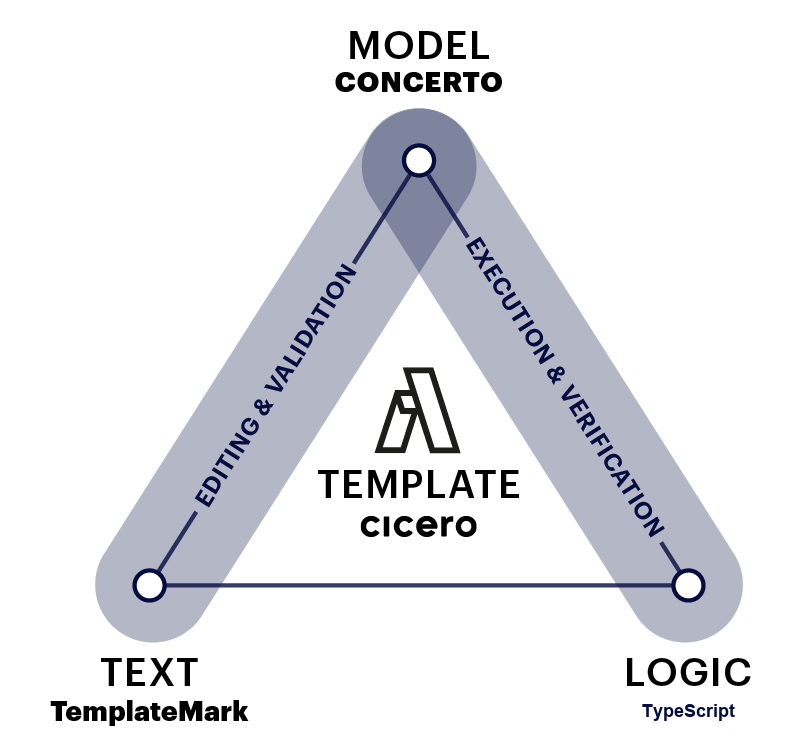
The three components (Text - Model - Logic) can also be intuitively understood as a progression, from human-readable legal text to machine-readable and machine-executable. When combined these three elements allow templates to be edited, validated, and then executed on any computer platform (on your own machine, on a Cloud platform, on Blockchain, etc).
We use the computing term 'executed' here, which means run by a computer. This is distinct from the legal term 'executed', which usually refers to the process of signing an agreement.
Template Text
The template text is the natural language of the clause or contract. It can include markup to indicate variables for that template.
The following shows the text of an Acceptance of Delivery clause.
## Acceptance of Delivery.

{{shipper}} will be deemed to have completed its delivery obligations
if in {{receiver}}'s opinion, the {{deliverable}} satisfies the
Acceptance Criteria, and {{receiver}} notifies {{shipper}} in writing
that it is accepting the {{deliverable}}.

## Inspection and Notice.

{{receiver}} will have {{businessDays}} Business Days to inspect and
evaluate the {{deliverable}} on the delivery date before notifying
{{shipper}} that it is either accepting or rejecting the
{{deliverable}}.

## Acceptance Criteria.

The 'Acceptance Criteria' are the specifications the {{deliverable}}
must meet for the {{shipper}} to comply with its requirements and
obligations under this agreement, detailed in {{attachment}}, attached
to this agreement.
The text is written in plain English, with variables between {{ and }}. Variables allows template to be used in different agreements by replacing them with different values.
For instance, the following show the same Acceptance of Delivery clause where the shipper is "Party A", the receiver is "Party B", the deliverable is "Widgets", etc.
## Acceptance of Delivery.

"Party A" will be deemed to have completed its delivery obligations
if in "Party B"'s opinion, the "Widgets" satisfies the
Acceptance Criteria, and "Party B" notifies "Party A" in writing
that it is accepting the "Widgets".

## Inspection and Notice.

"Party B" will have 10 Business Days to inspect and
evaluate the "Widgets" on the delivery date before notifying
"Party A" that it is either accepting or rejecting the
"Widgets".

## Acceptance Criteria.

The "Acceptance Criteria" are the specifications the "Widgets"
must meet for the "Party A" to comply with its requirements and
obligations under this agreement, detailed in "Attachment X", attached
to this agreement.
TemplateMark
TemplateMark is the markup format in which the text for Accord Project templates is written. It defines notations (such as the {{ and }} notation for variables used in the Acceptance of Delivery clause) which allows a computer to make sense of your templates.
It also provides the ability to specify the document structure (e.g., headings, lists), to highlight certain terms (e.g., in bold or italics), to indicate text which is optional in the agreement, and more.
More information about the Accord Project markup can be found in the Markdown Text Section of this documentation.
Template Model
Unlike a standard document template (e.g., in Word or pdf), Accord Project templates associate a model to the natural language text. The model acts as a bridge between the text and logic; it gives the users an overview of the components, as well as the types of different components.
The model categorizes variables (is it a number, a monetary amount, a date, a reference to a business or organization, etc.). This is crucial as it allows the computer to make sense of the information contained in the template.
The following shows the model for the Acceptance of Delivery clause.
/* The template model */
asset AcceptanceOfDeliveryClause extends AccordClause {

  /* the shipper of the goods*/
  --> Organization shipper

  /* the receiver of the goods */
  --> Organization receiver

  /* what we are delivering */
  o String deliverable

  /* how long does the receiver have to inspect the goods */
  o Integer businessDays

  /* additional information */
  o String attachment
}
Thanks to that model, the computer knows that the shipper variable ("Party A" in the example) and the receiver variable ("Party B" in the example) are both Organization types. The computer also knows that variable businessDays (10 in the example) is an Integer type; and that the variable deliverable ("Widgets" in the example) is a String type, and can contain any text description.
If you are unfamiliar with the different types of variables, or want a more thorough explanation of what variables are, please refer to our Glossary for a more detailed explanation.
Concerto
Concerto is the language which is used to write models in Accord Project templates. Concerto offers modern modeling capabilities including support for primitive types (numbers, dates, etc), nested or optional data structures, enumerations, relationships, object-oriented style inheritance, and more.
More information about Concerto can be found in the Concerto Model section of this documentation.
Template Logic
The combination of text and model already makes templates machine-readable, while the logic makes it machine-executable. Template logic is written in TypeScript for new templates, using a class-based pattern that integrates directly with the Concerto data model.
During Drafting
In the Overview Section, we already saw how logic can be embedded in the text of the template itself to automatically calculate a monthly payment for a fixed rate loan:
## Fixed rate loan

This is a *fixed interest* loan to the amount of {{loanAmount}}
at a yearly interest rate of {{rate}}%
with a loan term of {{loanDuration}},
and monthly payments of {{% monthlyPaymentFormula(loanAmount,rate,loanDuration) %}}.
This uses a monthlyPaymentFormula function which calculates the monthly payment based on the other data points in the text:
function monthlyPaymentFormula(loanAmount: number, rate: number, loanDuration: number): number {
  const term = loanDuration * 12;                      // Term in months
  if (rate === 0.0) return loanAmount / term;           // If the rate is 0
  const monthlyRate = rate / 12.0 / 100.0;             // Rate in months
  const monthlyPayment =                               // Payment calculation
    (monthlyRate * loanAmount)
    / (1.0 - Math.pow(1.0 + monthlyRate, -term));
  return Math.round(monthlyPayment);                   // Rounding
}
Each logic function has a name (e.g., monthlyPaymentFormula), a signature indicating the parameters with their types (e.g., loanAmount: number), and a body which performs the appropriate computation based on the parameters. The main payment calculation is here based on the standardized calculation used in the United States with * standing for multiplication, / for division, and Math.pow for exponentiation.
After Signature
The logic can also be used to associate behavior to the template after the contract has been signed. This can be used for instance to specify what happens when a delivery is received late, to check conditions for payment, determine if there has been a breach of contract, etc.
The following shows post-signature logic for the Acceptance of Delivery clause.
class SupplyAgreement extends TemplateLogic<SupplyAgreementModel> {
  async trigger(data: SupplyAgreementModel, request: InspectDeliverable): Promise<{ result: InspectionResponse }> {

    const received = new Date(request.deliverableReceivedAt);
    if (received > new Date()) {
      throw new Error("Transaction time is before the deliverable date.");
    }

    const inspectionDeadline = new Date(received);
    inspectionDeadline.setDate(inspectionDeadline.getDate() + data.businessDays);

    let status: string;
    if (new Date() > inspectionDeadline) {
      status = 'OUTSIDE_INSPECTION_PERIOD';
    } else if (request.inspectionPassed) {
      status = 'PASSED_TESTING';
    } else {
      status = 'FAILED_TESTING';
    }

    return {
      result: { status, shipper: data.shipper, receiver: data.receiver }
    };
  }
}
This logic describes what conditions must be met for a delivery to be accepted. It checks whether the delivery has already been made; whether the acceptance is timely, within the specified inspection date; and whether the inspection has passed or not.
Template Logic Language
TypeScript is the recommended language for writing contract logic in new Accord Project templates. Logic is expressed as a TypeScript class that extends TemplateLogic, with types generated from the Concerto model. Inline TypeScript expressions (using {{% return ... %}} syntax) can also be embedded directly in the template text.
Ergo was the original domain-specific language for Accord Project contract logic and is still supported for existing templates. New templates should use TypeScript.
More information about TypeScript template logic can be found in the demo-template repository. For legacy templates, the Ergo Logic guide remains available.
Cicero
The implementation for the Accord Project templates is called Cicero. It defines and can read the structure of templates, with natural language bound to a data model and logic. By doing this, Cicero allows users to create, validate and execute software templates which embody all three components in the template triangle above.
More information about how to install Cicero and get started with Accord Project templates can be found in the Installation Section of this documentation.
Let's look at each component of the template triangle, starting with the text.
What next?
Build your first smart legal contract templates, either online with Template Playground, or by installing Cicero.
Explore sample templates and other resources in the rest of this documentation.
If some of technical words are unfamiliar, please consult the Glossary for more detailed explanations.